
Electronic invoice viewer
Drop an e-invoice file of any common format: the page detects which format it is and opens it as a readable invoice, with a check against the official rules where they exist. Nothing is uploaded.
Free · runs in your browser · nothing is uploaded
An electronic invoice viewer opens an electronic invoice: an invoice issued, sent and received as structured data, usually XML, so that software can process it without retyping. A PDF alone is not one, unless the PDF carries the XML inside, as ZUGFeRD and Factur-X files do.
This viewer is one drop zone for all of them. You do not have to know the format: the page looks at the first bytes of the file, tells you what it found, and opens the matching viewer right below. XML invoices (UBL, CII) and e-invoice PDFs also get a validation report. If the file is something the page cannot open, it says so and names what it is.
Everything runs in your browser tab. The file is not uploaded, the page shows how many requests went to other servers (0), and it is free without an account.
At a glance
The electronic invoice viewer detects the format of an e-invoice file (UBL, UN/CEFACT CII, ZUGFeRD / Factur-X, XRechnung, FatturaPA, signed .p7m) and opens it as a readable invoice in the browser.
- Formats opened: UBL 2.1 and Peppol BIS 3.0, UN/CEFACT CII, XRechnung, ZUGFeRD and Factur-X PDFs, Italian FatturaPA (XML and .p7m).
- The format is detected from the first bytes of the file; formats that cannot be opened here are named and not guessed.
- The file is read in the browser tab and not uploaded; the page counts requests to other servers and shows 0.
Sources: EN 16931 validation artefacts 1.3.17 (CEN/TC 434) (checked 2026-11-11) · Peppol BIS Billing 3.0 (checked 2026-11-11)
How to open an e-invoice
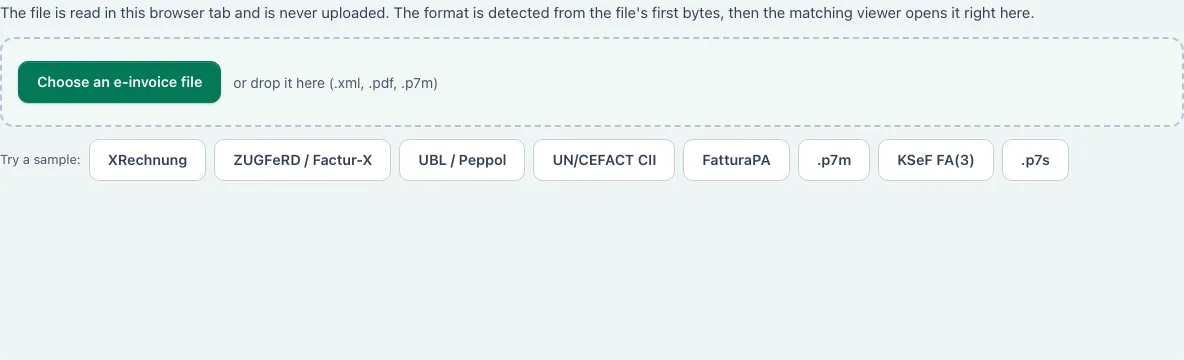
- Click Choose an e-invoice file or drop the file on the field. Files up to 30 MB are accepted.
- No file at hand? Click one of the sample buttons (XRechnung, ZUGFeRD / Factur-X, UBL / Peppol, UN/CEFACT CII, FatturaPA, .p7m). Each loads a fictitious invoice.
- Under the field the card Detected names the format. The viewer for that format opens below it.
- Read the invoice in the Invoice tab, check the Report tab if there is one, and look at the XML tab for the raw content.
- Use Print / save as PDF for a copy of the readable invoice.
Which files does the viewer open?
The viewer opens UBL 2.1 and Peppol BIS Billing 3.0 invoices, UN/CEFACT CII invoices, XRechnung, ZUGFeRD and Factur-X PDFs with the XML inside, and Italian FatturaPA as XML or as a signed .p7m. It decides from the first bytes of the file, then opens the viewer that fits and, for XML invoices and e-invoice PDFs, adds a validation report in which each finding names its rule and the place in the file. A format it cannot open is named and not guessed. Nothing needs to be installed, so it works the same on Windows, macOS, Linux, Android and iPhone.
Which e-invoice formats exist in Europe?
| Format | Where it is used | What the file is |
|---|---|---|
| EN 16931 UBL 2.1 | EU-wide syntax; Peppol BIS Billing 3.0 is built on it | XML |
| EN 16931 UN/CEFACT CII | EU-wide second syntax | XML |
| XRechnung | Germany, public buyers; a CIUS of EN 16931 | XML (UBL or CII) |
| ZUGFeRD / Factur-X | Germany, France; hybrid | PDF with CII XML inside |
| FatturaPA | Italy | XML, often signed as .xml.p7m |
| KSeF FA(3) | Poland | XML |
This page opens the first five rows of the table. Polish KSeF files are detected and named; the KSeF guide has the viewer for them, with the dates and terms. A detached signature (.p7s) and a signed e-mail are detected and named too; the P7S viewer shows the signer and checks the signature against the signed file. An encrypted file cannot be opened here, because that needs the recipient’s private key. Italian FatturaPA files that arrive signed (.xml.p7m) are opened here, and the P7M viewer is the focused page for any other signed document.
Is a PDF an electronic invoice?
Not by itself. A normal PDF is only a picture of an invoice. A ZUGFeRD or Factur-X file is a PDF that carries the invoice data as XML inside; that XML is the e-invoice, and this viewer reads and checks it. When a PDF has no XML inside, the viewer says so.
How do I check that an e-invoice is valid?
Drop the file here: for UBL, CII and ZUGFeRD / Factur-X the report lists every finding against EN 16931 and, where the file claims it, the XRechnung and Peppol rules. A clean report means the file follows the rules that were checked. It does not mean the content is right, and it is not a promise that the buyer will accept the file, for example the correct VAT rate or the correct customer. For a German XRechnung only, the XRechnung validator is the focused page.
Frequently asked questions
What is an electronic invoice, and is a PDF one?
An electronic invoice is issued, sent and received in a structured electronic format that software can process. A plain PDF is not one; a ZUGFeRD or Factur-X PDF is, because it carries the XML inside.
Which formats exist in Europe?
The common ones are UBL and UN/CEFACT CII (the two syntaxes of the European standard EN 16931), XRechnung, ZUGFeRD and Factur-X, Peppol BIS Billing 3.0, Italian FatturaPA and Polish KSeF FA(3). The table above shows which of them this page opens.
Where do I get a sample e-invoice?
Click a sample button on this page. Each one loads a fictitious invoice in that format; none is a real company’s invoice.
How do I check that an e-invoice is valid?
Open it here and read the Report tab. The check covers the XML schema and the business rules of EN 16931; XRechnung and Peppol rules apply when the file names them. A technical check is not tax or legal advice.
Is my file uploaded?
No. The file is read in your browser tab. Requests to our own statistics server are counted on a separate line and never contain the file content.
Does the viewer change my file?
No. The page only reads the file. The readable invoice, the report and the raw XML are shown next to each other, and the original stays as it is on your device.
What happens with a format you cannot open?
The page names the format it detected and says that it did not open the file. It does not guess.
Related tools
- Peppol BIS Billing 3.0 & UBL invoice viewer — Read and check Peppol BIS 3.0 / UBL invoices
- P7M Viewer: open a .p7m file online — Open a .p7m file and read its signer details
- KSeF in Poland: dates, FA(3), UPO and a viewer — KSeF dates, FA(3) and UPO explained, plus a KSeF XML viewer
- P7S viewer: open a .p7s file and check the signature — Open a .p7s signature and check it against the signed file
- What is e-invoicing? — E-invoice explained: formats, mandate dates, viewer