
P7S viewer: open a .p7s file and check the signature
A .p7s file is a digital signature that travels next to the file it signs. Add it here, add the signed file if you have it, and see who the certificate names, when it was signed and whether the signature still fits the file. Nothing is uploaded.
Free · runs in your browser · nothing is uploaded
A .p7s file is a digital signature kept apart from the file it signs. It usually arrives as an attachment named smime.p7s or as a .p7s next to a document, and most programs show it as an unknown file. Inside it are the signature, the signer’s certificate and, often, the time the signer says the file was signed. The signed document itself is not in it.
This viewer reads the .p7s in your browser tab and shows the signer’s certificate: the name, organisation, issuer, validity dates and serial number. If you also add the signed file, it checks whether the signature still matches that file. It also opens a signed e-mail saved as .eml, taking out the signed part and the signature itself, and a .p7m file that has its document inside.
At a glance
A .p7s file is a detached digital signature in the CMS (PKCS#7) format: it holds the signature and the signer's certificate but not the signed file; the p7s viewer on this page reads it in the browser, shows the signer certificate details and checks the signature against the signed file you add.
- Opens a detached .p7s, a signed S/MIME e-mail (.eml with a smime.p7s attachment) and a .p7m with the document inside, up to 30 MB, in binary or Base64 form.
- With the signed file added, each signature is checked mathematically against it; the result says whether the signature matches, not who the signer is.
- The signer details come from the certificate in the file; the chain of trust, revocation and the legal value of the signature are not checked.
- Nothing is uploaded: the files are read and checked in the browser tab.
Sources: RFC 5652 - Cryptographic Message Syntax (CMS) (checked 2026-11-11) · RFC 8551 - S/MIME Version 4.0 Message Specification (checked 2026-11-11) · European Commission - EU Trusted Lists browser (for legal validation) (checked 2026-11-11)
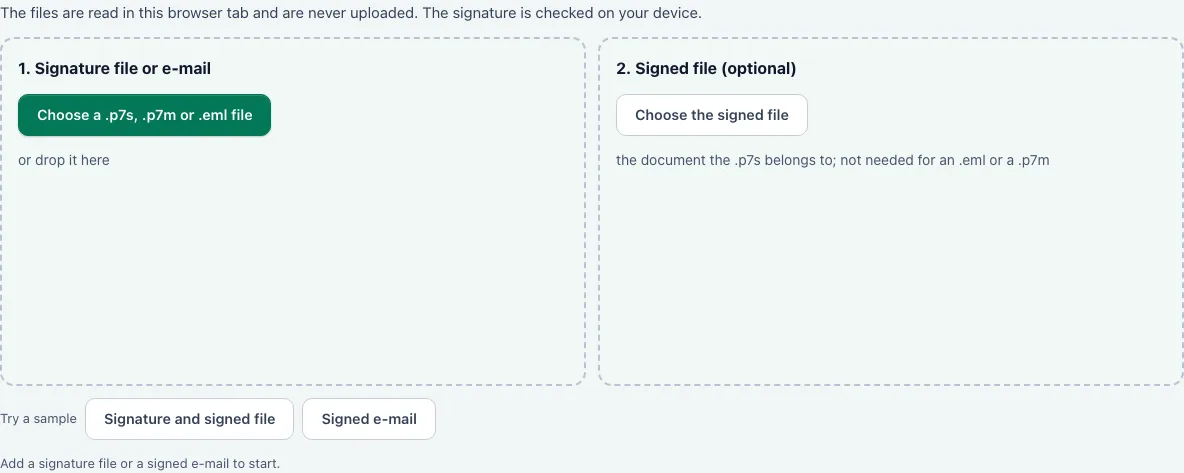
How to open a .p7s file
- In step 1, choose the .p7s file or drop it on the field. The signer details appear at once.
- In step 2, choose the file that was signed (the PDF, XML or other document the .p7s belongs to). The page then says whether the signature matches it. The signed file must be the exact original: a single changed byte gives “does not match”.
- For a signed e-mail, save it as an .eml file from your mail program and choose it in step 1. Step 2 is not needed: the page finds the signed part and the smime.p7s attachment in the message itself.
- For a .p7m or an smime.p7m attachment, choose it in step 1. The signature is checked against the document inside, and you can save that document. For a full view of the document, use the P7M viewer.
- To see how it works first, click Signature and signed file or Signed e-mail under the fields. Both samples were made by us with a throw-away test certificate.
How do I open a .p7s file on Windows or Android?
A .p7s has no document to open, so a program that opens it as a document will fail on any system. Open it here in the browser on Windows, macOS, Android or iPhone: the page does not need an app. For a signed e-mail, save the message as an .eml file in your mail program and check it here.
What is a .p7s file?
A .p7s file is a signature in the Cryptographic Message Syntax (CMS), also called PKCS#7, defined in RFC 5652. A signature that is stored apart from its content is called detached. S/MIME e-mail uses the same format: a signed message has two parts, the readable message and a signature part, usually named smime.p7s (RFC 8551).
What does “signature matches” mean?
The signer computed a hash of the file and signed it with a private key; the certificate in the .p7s holds the matching public key. This page repeats the hash on your file and checks it against the signature. If both fit, the file is the same as the one that was signed.
| This page checks | This page does not check |
|---|---|
| The signature fits the file you added | Whether the certificate was issued by a trusted authority |
| The certificate stored in the .p7s is the one that signed | Whether the certificate was revoked |
| Validity dates, self-signed and expired flags are shown | Whether the signing time is true: it is stated by the signer, unless a trusted timestamp is added |
| The legal value of the signature in your country |
A matching signature shows one thing: the file has not changed since it was signed with that certificate. It does not show who the signer really is, because anyone can create a certificate with any name. Read the certificate name as what the signer stated, and for a legally binding check use a qualified validation service of your country.
Why can’t I open smime.p7m?
There are two kinds. A signed smime.p7m holds the message with a signature around it, and this page opens it. An encrypted smime.p7m is locked for one recipient and needs that person’s private key, which this page never has: the page says so and does not try. The file name is the same for both, so the page looks inside the file to tell them apart.
How this tool works and where the numbers come from
The signature file is opened in your browser with the PKI.js library; a signed e-mail is split with the postal-mime parser, then the signature is checked against the signed part with the browser’s WebCrypto. The certificate is the one stored in the signature file. The chain of trust, revocation (OCSP/CRL) and the legal value are not checked.
Sources
- RFC 5652 - Cryptographic Message Syntax (CMS) (September 2009) · checked
- RFC 8551 - S/MIME Version 4.0 Message Specification (April 2019) · checked
Frequently asked questions
What is a .p7s file?
A detached digital signature in the CMS (PKCS#7) format. It holds the signature and the signer’s certificate, not the signed file.
How do I open a .p7s attachment from Outlook or Gmail?
Save the attachment and choose it in step 1 above, then add the signed file in step 2. For the whole message, save it as an .eml file and choose that in step 1.
Does a matching signature prove who signed?
No. It shows the file is unchanged since it was signed with the certificate in the signature file. The name in a certificate is not verified by this page, and anyone can make a certificate with any name. Use a qualified validation service to learn whether a signature is legally valid.
Why does it say the signature does not match?
The file you added is not byte for byte the file that was signed, or it was changed after signing (opening and saving a PDF is enough), or the .p7s belongs to another file. It can also mean the algorithm is not supported here; the message names that case.
Why can’t I open smime.p7m?
If it is encrypted, only the recipient’s private key can open it. If it is signed, choose it in step 1 and this page opens it.
Is my file uploaded?
No. The files are read and checked in your browser tab. Requests to our own statistics server never contain file content.
Related tools
- P7M Viewer: open a .p7m file online — Open a .p7m file and read its signer details
- Electronic invoice viewer — Open any e-invoice: the format is detected for you
- Peppol BIS Billing 3.0 & UBL invoice viewer — Read and check Peppol BIS 3.0 / UBL invoices
- What is e-invoicing? — E-invoice explained: formats, mandate dates, viewer
- KSeF in Poland: dates, FA(3), UPO and a viewer — KSeF dates, FA(3) and UPO explained, plus a KSeF XML viewer